Best docking stations for MacBook
A MacBook dock adds monitors, USB ports, Ethernet and charging through one cable. Most MacBook Air and base M-chip models drive only one external monitor natively; for two or more, you need a DisplayLink dock.
Affiliate links · we may earn a commission



Top pick
CalDigit TS5 Plus
20-port Thunderbolt 5 dock with 10GbE and SD
- Works with MacBooks over USB-C or Thunderbolt
- Monitors
- 1
- Connects by
- Thunderbolt / USB4
- Ports
- 20
- Ethernet
- Yes
- SD card reader
- Yes
- DisplayLink (needs a driver)
- No
PriceToday's price on AmazonView on Amazon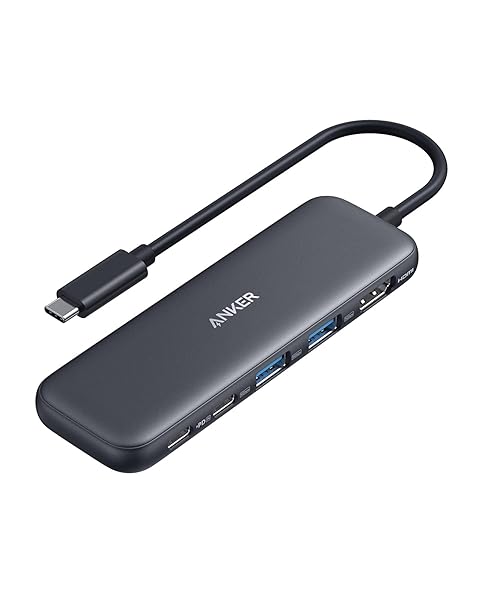
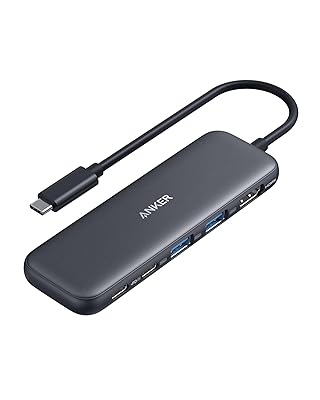
Anker 5-in-1 USB-C Hub
USB-C hub with 4K HDMI, 3 USB ports and 100W PD-in
- Works with MacBooks over USB-C or Thunderbolt
- Monitors
- 1
- Best resolution
- 4K at 30 Hz
- Laptop charging
- 100W
- Kind
- Hub (no power brick)
- Connects by
- USB-C
- Ports
- 5
PriceToday's price on AmazonView on Amazon
CalDigit TS4
18-port Thunderbolt 4 dock, 98W charging, 2.5GbE
- Works with MacBooks over USB-C or Thunderbolt
- Monitors
- 2
- Best resolution
- 5K and up
- Laptop charging
- 98W
- Connects by
- Thunderbolt / USB4
- Ports
- 18
- Ethernet
- Yes
PriceToday's price on AmazonView on Amazon
UGREEN 5-in-1 USB-C Hub
USB-C hub with 4K HDMI, 3 USB-A and 100W PD
- Works with MacBooks over USB-C or Thunderbolt
- Monitors
- 1
- Best resolution
- 4K at 30 Hz
- Laptop charging
- 100W
- Kind
- Hub (no power brick)
- Connects by
- USB-C
- Ports
- 5
PriceToday's price on AmazonView on Amazon
BENFEI 5-in-1 USB-C Hub
Aluminum USB-C hub with 4K HDMI, 3 USB-A, 100W PD
- Works with MacBooks over USB-C or Thunderbolt
- Monitors
- 1
- Best resolution
- 4K at 30 Hz
- Laptop charging
- 100W
- Kind
- Hub (no power brick)
- Connects by
- USB-C
- Ports
- 5
PriceToday's price on AmazonView on Amazon
Acer 7-in-1 USB-C Hub
Aluminum USB-C hub with 4K30 HDMI and microSD
- Works with MacBooks over USB-C or Thunderbolt
- Monitors
- 1
- Best resolution
- 4K at 30 Hz
- Kind
- Hub (no power brick)
- Connects by
- USB-C
- Ports
- 7
- Ethernet
- No
PriceToday's price on AmazonView on Amazon
UGREEN Revodok 6-in-1 Ethernet
USB-C hub with 4K30 HDMI, gigabit LAN, 100W PD
- Works with MacBooks over USB-C or Thunderbolt
- Monitors
- 1
- Best resolution
- 4K at 30 Hz
- Laptop charging
- 100W
- Kind
- Hub (no power brick)
- Connects by
- USB-C
- Ports
- 6
PriceToday's price on AmazonView on Amazon
UGREEN Revodok Pro 6-in-1
10Gbps USB-C hub with 4K60 HDMI and 100W PD
- Works with MacBooks over USB-C or Thunderbolt
- Monitors
- 1
- Best resolution
- 4K at 60 Hz
- Laptop charging
- 100W
- Kind
- Hub (no power brick)
- Connects by
- USB-C
- Ports
- 6
PriceToday's price on AmazonView on Amazon
Plugable Dual HDMI Docking Station
Dock for two 1080p HDMI monitors, M1–M5 Macs
- Works with MacBooks over USB-C or Thunderbolt
- Monitors
- 2
- Best resolution
- 1080p
- Ethernet
- No
- SD card reader
- No
- DisplayLink (needs a driver)
- No
PriceToday's price on AmazonView on Amazon
Budget pick
UANTIN 7-in-1 USB-C Hub
USB-C hub with HDMI, 3 USB-A, SD/TF and PD
- Works with MacBooks over USB-C or Thunderbolt
- Monitors
- 1
- Kind
- Hub (no power brick)
- Connects by
- USB-C
- Ports
- 7
- Ethernet
- No
- SD card reader
- Yes
PriceToday's price on AmazonView on Amazon
How we picked
We compared 40 docking stations with real Amazon listings and kept the 39 that meet all of this:
- Works with MacBooks over USB-C or Thunderbolt
Every pick fits, so the order is about what to look at first. Models that independent reviewers recommend come first, the most often recommended at the top. The rest follow, best known and best liked first, with the newest model of a line ahead of older ones. No brand pays to be listed or placed higher. Prices change daily, so we never print one; Amazon shows today's price.
Reviews we drew on
We don't test products ourselves. These published roundups recommend picks on this list:
- tomshardware.com The Best Thunderbolt and USB-C Docks in 2026
- ca.pcmag.com The Best MacBook Docking Stations for 2026
- laptopmag.com Best laptop docking stations in 2025: My 7 top tested picks
- wired.com The 6 Best Laptop Docking Stations to Unlock the Full Desktop Experience (2026)
Questions
What are the best docking stations for MacBook?
Our top three are the CalDigit TS5 Plus, Anker 5-in-1 USB-C Hub and CalDigit TS4. Each one meets everything this guide asks for.
What should docking stations for MacBook have?
Works with macbooks over usb-c or thunderbolt. Every pick on this list does.
Are these links sponsored?
Links to Amazon may earn Build Your Setup a commission. It does not change what you pay, and no brand pays to be listed or placed higher.