j5create
USB-C Triple Monitor Dock
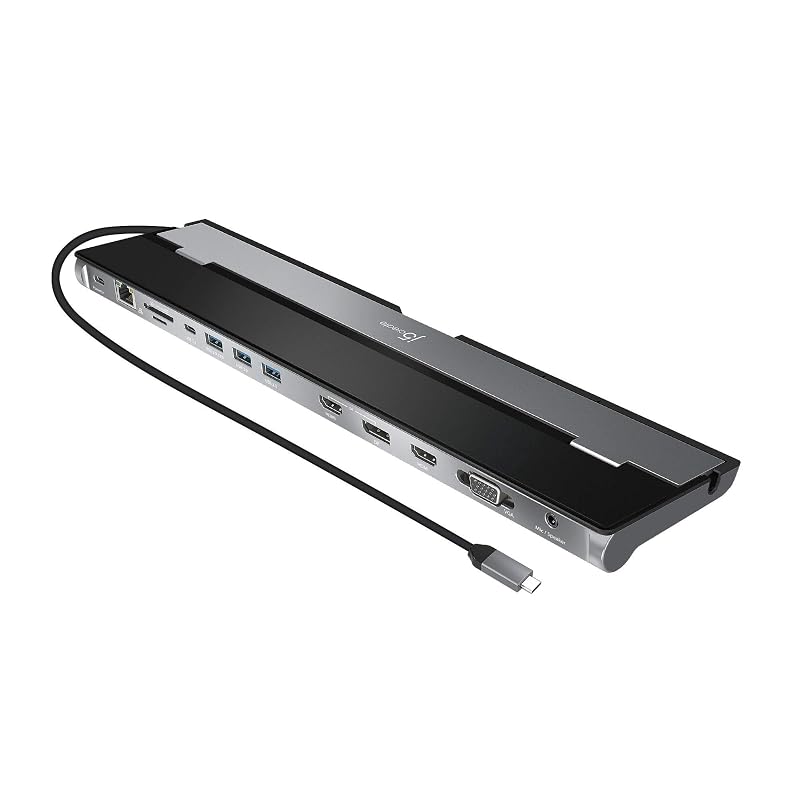
The j5create USB-C Triple Monitor Dock offers versatile triple-display connectivity and strong charging but requires drivers and runs warm.
Summed up from 8 published reviews
Affiliate link · we may earn a commission
What reviewers like
Best for
Windows users needing triple monitors with high power delivery
Skip it if
Mac users wanting plug-and-play or Linux compatibility
Where it fits
- laptop
- MacBookWindows laptop
- monitors
- OneTwoThree
- must-haves
- Charges the laptopEthernetSD card reader
Specs
- Monitors
- 3
- Laptop charging
- 90W
- Kind
- Dock (own power supply)
- Connects by
- USB-C
- Ports
- 13
- Ethernet
- Yes
- SD card reader
- Yes
- DisplayLink (needs a driver)
- No
Also worth a look
 NOVOO15-in-1 Docking StationThe NOVOO 15-in-1 Docking Station offers extensive connectivity and triple-display support for Windows, but…
 Anker11-in-1 USB-C HubA versatile 11-in-1 hub offering dual 4K@60Hz, 10Gbps USB, and 85W pass-through, but requires a separate…
 Acer13-in-1 Docking StationA versatile Windows-focused docking station with triple-monitor support and broad connectivity, but limited…
 TobenONEMacBook Docking Station StandStrong all-in-one dock for Pro/Max MacBooks needing dual 4K displays and charging, but base M-series models…
 Lemorele12-in-1 Docking StationThe Lemorele TC1000 offers triple 4K@60Hz display support, fast 10Gbps USB ports, dual card readers, and 100W…
 TobenONE18-in-2 Docking StationA feature-rich MacBook dock with multi-monitor support and high power delivery, but limited by DisplayLink…
Questions
Is the j5create USB-C Triple Monitor Dock worth it?
The j5create USB-C Triple Monitor Dock offers versatile triple-display connectivity and strong charging but requires drivers and runs warm.
What do reviewers like about the j5create USB-C Triple Monitor Dock?
Supports three displays via HDMI, DisplayPort, VGA. Delivers up to 100W pass-through charging. Provides three USB-A ports for peripherals. Includes SD/microSD card readers. Compact, portable design fits small workspaces.
What are the downsides of the j5create USB-C Triple Monitor Dock?
Generates noticeable heat during extended use. Requires driver installation; not plug-and-play. macOS compatibility limited; may need workarounds. Reliability issues reported with HDMI ports.
Who should buy the j5create USB-C Triple Monitor Dock?
Windows users needing triple monitors with high power delivery. Skip it if mac users wanting plug-and-play or Linux compatibility.
Sources
We don't test products ourselves. This page sums up 8 published reviews, read on October 24, 2026; each point above links to the reviews that make it.
- devicedaily.com J5Create USB-C™ Triple Display Docking Station with 90W PD Adapter: The Hub of Choice | DeviceDaily.com
- blog.ericburnsonline.com j5 USB-C Triple Display Docking Station — Eric Burns Online
- bestbuy.com Customer Ratings & Reviews
- youtube.com Full review of the j5create USB Type C Docking Station ...
- screenextendershub.com j5create USB C 4K Triple Display Hub review | ScreenExtendersHub
- youtube.com Review j5create JCD397 4K60 Elite USB C® Triple ...
- screenextendershub.com j5create USB Type C Docking Station Review | ScreenExtendersHub
- minipcreviewer.com J5create USB-C Docking Station Review - Mini PC Reviewer