Build Your Setup

Aula F99 vs F99 Pro

What published reviews say about each, where the two differ, and who each one suits.

Summed up from 16 published reviews

Aula F99

Aula

F99

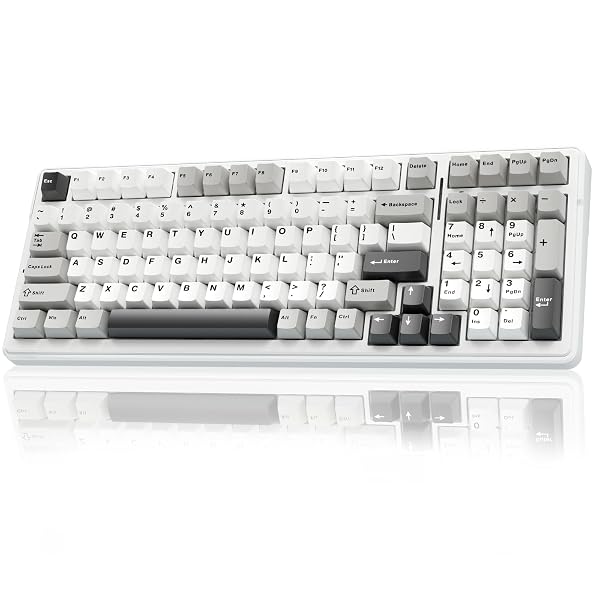
The AULA F99 offers strong value, flexible wireless connectivity, and hot-swap convenience, though its plastic chassis and software limitations may deter enthusiasts.

Best for
Budget-conscious shoppers wanting wireless connectivity, hot-swap capability, and a numpad.
Skip it if
You need a metal chassis, advanced remapping, or a rigid typing feel.
PriceToday's price on AmazonView on Amazon
What reviewers say about the Aula F99
Aula F99 Pro

Aula

F99 Pro

The Aula F99 Pro delivers excellent battery life, versatile connectivity, and solid typing feel at a budget price, but suffers from limited software and no shine-through keycaps.

Best for
Productivity users needing numpad, long battery, multi-device
Skip it if
Require macOS support, QMK/VIA, or shine-through legends
PriceToday's price on AmazonView on Amazon
What reviewers say about the Aula F99 Pro

Affiliate link · we may earn a commission

Specs side by side

SpecAula F99Aula F99 Pro
SwitchesLinear–
SizeFull sizeFull size
Best forGaming, TypingGaming, Typing
WirelessYesYes
Hot-swapYesYes
BacklightRGBRGB

Rows where the two differ come first.

Where only one fits

feel
F99Smooth

What reviewers like, and what they don't

Aula F99

  • Competitive pricing pairs extensive features with solid everyday performance. 1257
  • Flexible tri-mode connectivity supports PCs, tablets, and phones. 2456
  • Hot-swappable sockets make switch changes easy without soldering. 2456
  • Compact layout retains a numeric keypad and arrow keys. 2456
  • Gasket mounting and dampening deliver a softer, quieter typing experience. 2457
  • ABS plastic chassis may feel less premium than metal alternatives. 56
  • Software and remapping can feel limited, tedious, or complex. 1578
  • Keycap styling may disappoint buyers seeking polished aesthetics. 27
  • Switch-dependent sound may not suit every typing preference. 1248

Aula F99 Pro

  • Excellent 8000mAh battery lasts weeks 1256
  • Tri-mode connectivity: Bluetooth, 2.4GHz, wired 1256
  • Gasket mount with multi-layer sound dampening 2567
  • Hot-swappable switches and rotary knob 2567
  • Software limited, Windows-only, no QMK/VIA 1367
  • No shine-through keycaps, poor RGB legibility 58
  • Heavy weight reduces portability 267
  • Long charging time due to large battery 678

Sources

We don't test products ourselves. This page sums up 16 published reviews, read on October 23, 2026; each point above links to the reviews that make it.

Aula F99

  1. rtings.com AULA F99/F75 Review - RTINGS.com
  2. canbuyornot.com Aula F99 Gasket Mechanical Keyboard review: Amazing sound - Can Buy or Not
  3. youtube.com Aula F99 Review - Does it Live Up to the Hype?
  4. techgurureviews.com AULA F99 Wireless Mechanical Keyboard: Is It Worth The Hype? (Sponsored) - TechGuruReviews
  5. gearzon.com AULA F99 Review: Worth Buying? - GearZon
  6. zeden.net ZeDen teste le clavier Aula F99
  7. craftingworlds.com Aula F99 Review: Affordable Mechanical Keyboard for Productivity - Crafting Worlds
  8. quasarzone.com AULA F99 - 99키 유무선 기계식 키보드 리뷰 | 퀘이사존 QUASARZONE

Aula F99 Pro

  1. igeekphone.com Aula F99 Pro Worth It? In-Depth Review of the $89 Wireless Keyboard
  2. aphnetworks.com MechLands AULA F99 Pro Review (Page 1 of 4) | APH Networks
  3. rtings.com AULA F99/F75 Keyboard Review
  4. dvhardware.net MechLands AULA F99 Pro Wireless Mechanical Keyboard review - DVHARDWARE
  5. technuovo.com AULA F99 Pro Gaming Keyboard Review - TechNuovo
  6. techxreviews.com AULA F99 Pro Review: A Mechanical Keyboard With Great Features for an Affordable Price | Techxreviews
  7. gizmovue.com AULA F99 Pro Review: Best Budget Mechanical Keyboard Under $100? - GizmoVue
  8. xiaomitoday.com AULA F99 Pro Review - Tri-Mode Mechanical Keyboard with Knob and 8000mAh Battery - XiaomiToday