Aula
S75 Pro
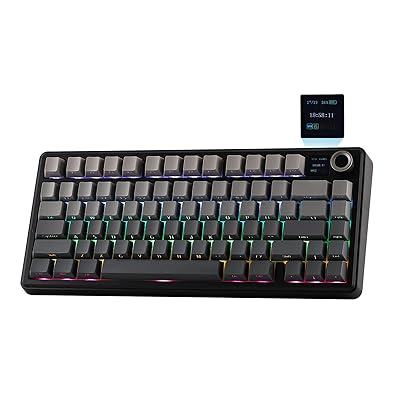
The Aula S75 Pro is a feature-rich, good-value 75% keyboard with a satisfying feel, though some features rely on Windows-based software.
Summed up from 8 published reviews
Affiliate link · we may earn a commission

What reviewers like
- Gasket mounting and 75% layout balance suspension, feel, and desk space. 256
- LCD knob displays status and enables convenient on-device control. 3578
- Tri-mode USB-C, 2.4GHz, and Bluetooth support versatile multi-device use. 2357
- Hot-swappable switches and PBT keycaps add flexibility and everyday durability. 267
- Users praise the sturdy feel, creamy sound, and typing experience. 368
Best for
Wireless users wanting a feature-rich 75% board with an LCD knob
Skip it if
You need open-source firmware, rapid trigger, or seamless macOS screen controls
Where it fits
- use
- GamesTyping & code
- size
- 75%
- connection
- Wireless
Specs
- Size
- 75%
- Best for
- Gaming, Typing
- Wireless
- Yes
- Hot-swap
- Yes
- Backlight
- RGB
Also worth a look
 AulaF75 Max (Epomaker)A feature-rich 75% mechanical keyboard with strong sound, typing feel, connectivity, and battery life, though…
 AulaF75The Aula F75 is a feature-rich, compact 75% keyboard with strong value, flexible tri-mode connectivity, and…
 AulaF75 ProThe Aula F75 Pro offers strong value and flexible connectivity, but reported quality-control problems and…
Questions
Is the Aula S75 Pro worth it?
The Aula S75 Pro is a feature-rich, good-value 75% keyboard with a satisfying feel, though some features rely on Windows-based software.
What do reviewers like about the Aula S75 Pro?
Gasket mounting and 75% layout balance suspension, feel, and desk space. LCD knob displays status and enables convenient on-device control. Tri-mode USB-C, 2.4GHz, and Bluetooth support versatile multi-device use. Hot-swappable switches and PBT keycaps add flexibility and everyday durability. Users praise the sturdy feel, creamy sound, and typing experience.
What are the downsides of the Aula S75 Pro?
Some screen syncing and GIF features require Windows or desktop software. No QMK, ZMK, or VIA support; customization depends on vendor software. The plastic chassis feels less rigid than aluminum alternatives. No rapid trigger or adjustable actuation for competitive FPS play.
Who should buy the Aula S75 Pro?
Wireless users wanting a feature-rich 75% board with an LCD knob. Skip it if you need open-source firmware, rapid trigger, or seamless macOS screen controls.
Sources
We don't test products ourselves. This page sums up 8 published reviews, read on October 21, 2026; each point above links to the reviews that make it.
- youtube.com
- gadreview.com AULA S75 Pro Review – Wireless 75% Keyboard Worth Buying? | GadReview.com
- raylogy.com 노브에 액정 스크린 달린 독거미 S75 PRO 키보드 사용 후기
- youtube.com AULA S75 Pro — The Best Keyboard Under 6K?
- youtube.com Which keyboard is better? The aula F75 vs the aula s75 gaming keyboards #review #keyboard #aula #s75
- youtube.com AULA S75 Pro Mechanical Keyboard Tech Spotlight
- manualsee.com Aula S75 Pro Tri Mode Mechanical Gaming Keyboard | Manualsee
- reddb.ai AULA S75 Pro Review | 73 Reddit Mentions