OWC
Thunderbolt Hub
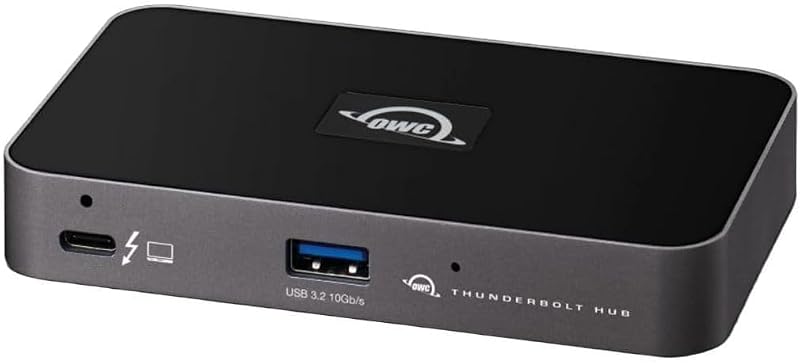
The OWC Thunderbolt Hub adds multiple high-speed Thunderbolt ports and a USB-A port in a compact powered hub, but its 60W charging on TB4 models may not suffice for larger laptops and it lacks full dock features like Ethernet.
Summed up from 8 published reviews
Affiliate link · we may earn a commission
What reviewers like
- Adds three to four Thunderbolt ports plus 10Gbps USB-A 1478
- Compact self-powered design supports dual 4K or single 8K displays 2345
- Delivers up to 60W or 140W host charging depending on model 126
- Includes macOS ejection software and works on Windows and Linux 18
- More affordable than full Thunderbolt docks with similar port count 2467
Best for
Users needing extra Thunderbolt ports for storage and displays
Skip it if
Need >60W charging, built-in Ethernet, or seamless Windows/Linux TB
Where it fits
- laptop
- MacBookWindows laptop
- monitors
- One
- must-haves
- 4K at 60 Hz
Specs
- Monitors
- 1
- Best resolution
- 5K and up
- Connects by
- Thunderbolt / USB4
- Ports
- 5
- Ethernet
- No
- SD card reader
- No
- DisplayLink (needs a driver)
- No
Also worth a look
 TobenONEMacBook Docking Station StandStrong all-in-one dock for Pro/Max MacBooks needing dual 4K displays and charging, but base M-series models…
 TobenONE18-in-2 Docking StationA feature-rich MacBook dock with multi-monitor support and high power delivery, but limited by DisplayLink…
 UGREEN8-in-1 Thunderbolt 4 DockVersatile Thunderbolt 4 hub with strong performance and charging, but limited built-in video and audio ports.
 PlugableThunderbolt 4 DockThe Plugable Thunderbolt 4 Dock offers extensive connectivity and multi-display support at a competitive…
 WAVLINKThunderbolt 4 DockWAVLINK Thunderbolt 4 Dock offers exceptional value with abundant ports, strong charging, and multi-monitor…
 Plugable14-in-1 Thunderbolt DockVersatile 14-port Thunderbolt dock with dual 4K support and high power delivery, but pricey and requires…
Questions
Is the OWC Thunderbolt Hub worth it?
The OWC Thunderbolt Hub adds multiple high-speed Thunderbolt ports and a USB-A port in a compact powered hub, but its 60W charging on TB4 models may not suffice for larger laptops and it lacks full dock features like Ethernet.
What do reviewers like about the OWC Thunderbolt Hub?
Adds three to four Thunderbolt ports plus 10Gbps USB-A. Compact self-powered design supports dual 4K or single 8K displays. Delivers up to 60W or 140W host charging depending on model. Includes macOS ejection software and works on Windows and Linux. More affordable than full Thunderbolt docks with similar port count.
What are the downsides of the OWC Thunderbolt Hub?
60W charging on TB4 models may be insufficient for larger laptops. Lacks built-in Ethernet, extra USB-A ports, and other dock features. Large external power brick reduces portability. Windows and Linux Thunderbolt performance may require driver setup.
Who should buy the OWC Thunderbolt Hub?
Users needing extra Thunderbolt ports for storage and displays. Skip it if need >60W charging, built-in Ethernet, or seamless Windows/Linux TB.
Sources
We don't test products ourselves. This page sums up 8 published reviews, read on October 24, 2026; each point above links to the reviews that make it.
- macworld.com OWC Thunderbolt Hub review: Finally a simple way to add more Thunderbolt ports to a MacBook | Macworld
- techradar.com OWC Thunderbolt Hub review | TechRadar
- appleinsider.com OWC Thunderbolt Hub review: Three Thunderbolt ports ...
- pcwelt.de OWC Thunderbolt Hub im Test: Drei TB4-Ports zum günstigen Preis – PC-WELT
- camerajabber.com OWC Thunderbolt Hub Review
- macworld.com OWC Thunderbolt 5 Hub review: Affordable super 80Gbps ...
- 9to5toys.com Run your 15-inch MacBook Air using OWC's Thunderbolt 4 hub with 60W charging at $100
- thunderboltlaptop.com Using OWC Thunderbolt 4 Hub on Linux, Windows, macOs