Build Your Setup

Keychron K2 vs K8

What published reviews say about each, where the two differ, and who each one suits.

Summed up from 16 published reviews

Keychron K2

Keychron

K2

The Keychron K2 is a compact, well-priced multi-device mechanical keyboard with solid build and long battery life, but its tall profile, fixed switches, and imperfect stabilizers limit appeal to some enthusiasts.

Best for
Budget-conscious Mac and Windows users needing multi-device switching
Skip it if
You need a low-profile, hot-swappable, ultra-quiet keyboard
PriceToday's price on AmazonView on Amazon
What reviewers say about the Keychron K2
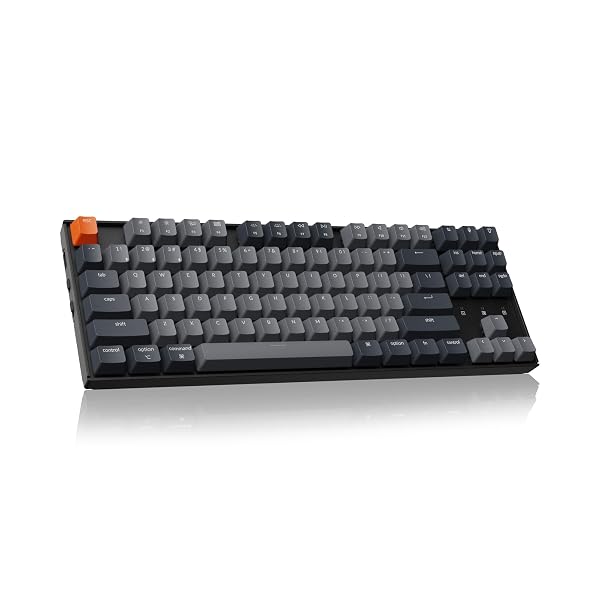
Keychron K8

Keychron

K8

The Keychron K8 is a versatile, budget-friendly TKL, but features and performance depend on the exact version.

Best for
Budget-conscious typists and casual gamers wanting versatile TKL connectivity.
Skip it if
Competitive gamers prioritizing low-latency wireless or extensive RGB control.
PriceToday's price on AmazonView on Amazon
What reviewers say about the Keychron K8

Affiliate link · we may earn a commission

Specs side by side

SpecKeychron K2Keychron K8
Size75%Tenkeyless
Switches–Tactile
Best forTyping, OfficeGaming, Office, Typing
WirelessYesYes
Hot-swapNoNo

Rows where the two differ come first.

Where only one fits

use
K8Games
size
K275%
K8Tenkeyless
feel
K8Bumpy

What reviewers like, and what they don't

Keychron K2

  • Compact 75% layout saves desk space 2357
  • Three-device Bluetooth switching and flexible USB-C wired use 1345
  • Long battery life, especially with backlighting off 137
  • Mac-friendly keys and broad operating system compatibility 3468
  • Solid build and strong value for the price 1468
  • Tall, bulky profile can strain wrists without a rest 3467
  • Fixed switches limit future customization and upgrades 258
  • Stabilizers can rattle, ping, or wobble inconsistently 125
  • Lighting controls and customization options can feel basic 1247

Keychron K8

  • Bluetooth and USB-C enable flexible multi-device use. 1234
  • Hot-swappable versions simplify switch upgrades without soldering. 1235
  • TKL layout saves space without sacrificing navigation keys. 1248
  • Long battery claims support extended wireless use. 235
  • Sturdy construction and features make it strong value. 2348
  • Some variants suffer Bluetooth lag and unreliable backspace behavior. 1235
  • Keycaps, lighting, and sound quality vary noticeably between versions. 1345
  • Tall profiles and heavy switches can fatigue long-session users. 248
  • Software customization can feel limited on some variants. 145

Ranked in our guides

Sources

We don't test products ourselves. This page sums up 16 published reviews, read on October 21, 2026; each point above links to the reviews that make it.

Keychron K2

  1. pcgamer.com Keychron K2 Version 2 review: affordable wireless mechanical gaming keyboard | PC Gamer
  2. rtings.com Keychron K2 (Version 2) Review - RTINGS.com
  3. imore.com Keychron K2 V2 review: A great introduction to mechanical keyboards | iMore
  4. mactrast.com Review: Keychron K2 Wireless Mechanical Keyboard - Is This The Best Keyboard for The Mac?
  5. switchandclick.com Keychron K2 V2 Review: They Fixed It! - Switch and Click
  6. cultofmac.com Keychron K2 review: The best mechanical keyboard for iPad | Cult of Mac
  7. hardwarecanucks.com Hype vs Reality - Keychron K2 Keyboard Review
  8. perrotta.dev ★ Keychron K2: Review

Keychron K8

  1. rtings.com Keychron K8 Review - RTINGS.com
  2. gomechanicalkeyboard.com Keychron K8 Review – Everything You Would Want In a TKL Keyboard – GoMK
  3. techteamgb.co.uk Keychron K8 Wireless* Mechanical Keyboard Review
  4. geekhack.org Keychron K8 Review
  5. tomshardware.com Keychron K8 Pro Review: Not So Professional | Tom's Hardware
  6. youtube.com Keychron K8 Wireless* Mechanical Keyboard Review
  7. tomshardware.com Keychron K8 HE Special Edition Review: magnetic mid ...
  8. tomsguide.com Keychron K8 V2 review | Tom's Guide