Best mechanical keyboards
A mechanical keyboard has a separate switch under every key, so each press feels the same and the switches last tens of millions of presses. The switch type sets the feel: linear for smooth, tactile for a bump, clicky for an audible click. Hot-swap sockets let you change switches later without soldering. Split ergonomic boards have their own guide.
Quick answer The Aula F75 Pro is our top pick, followed by the Keychron Q6 HE and Keychron V5 Max.
Affiliate links · we may earn a commission


Top pick
Aula F75 Pro
75% wireless gasket board with knob, hot-swap
- 75%, compact with an F-row
- Size
- 75%
- Switches
- Linear
- Best for
- Gaming, Typing
- Wireless
- Yes
- Hot-swap
- Yes
- Backlight
- RGB
PriceToday's price on AmazonView on Amazon
Keychron Q6 HE
Aluminum full-size wireless magnetic board
- Full size with number pad
- Size
- Full size
- Switches
- Magnetic
- Best for
- Gaming
- Wireless
- Yes
- Hot-swap
- Yes
- Backlight
- RGB
PriceToday's price on AmazonView on Amazon
Keychron V5 Max
96% wireless QMK, hot-swap Banana tactile
- Full size with number pad
- Size
- Full size
- Switches
- Tactile
- Best for
- Gaming, Office, Typing
- Wireless
- Yes
- Hot-swap
- Yes
- Backlight
- RGB
PriceToday's price on AmazonView on Amazon
Razer BlackWidow V4 75%
75% hot-swap board, orange tactile switches
- 75%, compact with an F-row
- Size
- 75%
- Switches
- Tactile
- Best for
- Gaming
- Wireless
- No
- Hot-swap
- Yes
- Backlight
- RGB
PriceToday's price on AmazonView on Amazon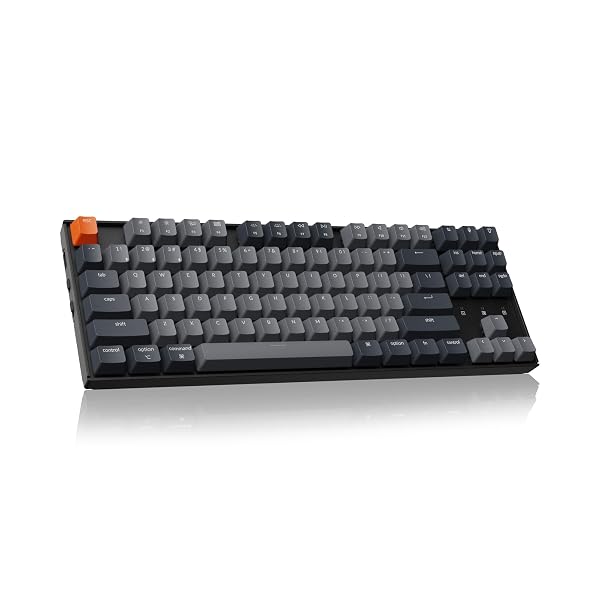
Keychron K8
TKL wireless mechanical, brown switches
- Tenkeyless, more mouse room
- Size
- Tenkeyless
- Switches
- Tactile
- Best for
- Gaming, Office, Typing
- Wireless
- Yes
- Hot-swap
- No
PriceToday's price on AmazonView on Amazon
Keychron V6 Max
Full-size wireless QMK, hot-swap Gateron brown
- Full size with number pad
- Size
- Full size
- Switches
- Tactile
- Best for
- Gaming, Office, Typing
- Wireless
- Yes
- Hot-swap
- Yes
- Backlight
- RGB
PriceToday's price on AmazonView on Amazon
Budget pick
Royal Kludge R65
65% wired gasket board, hot-swap cream linear
- 65%, small with arrows
- Size
- 65%
- Switches
- Linear
- Best for
- Gaming, Typing
- Wireless
- No
- Hot-swap
- Yes
- Backlight
- RGB
PriceToday's price on AmazonView on Amazon
Keychron C3 Pro
Wired TKL QMK, hot-swap Banana tactile, 8K
- Tenkeyless, more mouse room
- Size
- Tenkeyless
- Switches
- Tactile
- Best for
- Gaming, Office, Typing
- Wireless
- No
- Hot-swap
- Yes
- Backlight
- RGB
PriceToday's price on AmazonView on Amazon
Keychron V5 Ultra 8K
96% wireless board, 8K polling, hot-swap
- Full size with number pad
- Size
- Full size
- Switches
- Tactile
- Best for
- Typing, Gaming
- Wireless
- Yes
- Hot-swap
- Yes
- Backlight
- RGB
PriceToday's price on AmazonView on Amazon
Keychron K2 HE
75% wireless magnetic, rapid trigger, wood
- 75%, compact with an F-row
- Size
- 75%
- Switches
- Magnetic
- Best for
- Gaming
- Wireless
- Yes
- Hot-swap
- Yes
- Backlight
- RGB
PriceToday's price on AmazonView on Amazon
Compare the top picks
| Model | Size | Switches | Best for | Wireless | Hot-swap |
|---|---|---|---|---|---|
| Aula F75 Pro | 75% | Linear | Gaming, Typing | Yes | Yes |
| Keychron Q6 HE | Full size | Magnetic | Gaming | Yes | Yes |
| Keychron V5 Max | Full size | Tactile | Gaming, Office, Typing | Yes | Yes |
| Razer BlackWidow V4 75% | 75% | Tactile | Gaming | No | Yes |
| Keychron K8 | Tenkeyless | Tactile | Gaming, Office, Typing | Yes | No |
| Keychron V6 Max | Full size | Tactile | Gaming, Office, Typing | Yes | Yes |
| Royal Kludge R65 | 65% | Linear | Gaming, Typing | No | Yes |
| Keychron C3 Pro | Tenkeyless | Tactile | Gaming, Office, Typing | No | Yes |
| Keychron V5 Ultra 8K | Full size | Tactile | Typing, Gaming | Yes | Yes |
| Keychron K2 HE | 75% | Magnetic | Gaming | Yes | Yes |
What to look for
Linear, tactile or clicky?
Linear switches travel straight down smoothly and are popular for gaming. Tactile switches have a small bump that tells your finger the key has fired, which many typists like. Clicky switches add an audible click to the bump: satisfying for you, often annoying for anyone nearby.
Hot-swap sockets and build
Hot-swap sockets let you change switches without soldering, so you can try a new feel later. Gasket-mounted boards with foam inside sound deeper and softer than cheap plate-mounted ones. PBT keycaps resist the shiny wear that ABS caps pick up over time.
Size: from full to 60%
Full size keeps the number pad, tenkeyless drops it, 75% packs everything closer, 65% drops the function row and 60% drops the arrows too. Most people are happiest with tenkeyless or 75%: every key they use, and more room for the mouse.
How we picked
We compared 232 keyboards with real Amazon listings and kept the 125 that meet all of this:
- 75%, compact with an F-row
Every pick fits, so the order is about what to look at first. Models that independent reviewers recommend come first, the most often recommended at the top. The rest follow, best known and best liked first, with the newest model of a line ahead of older ones. No brand pays to be listed or placed higher. Prices change daily, so we never print one; Amazon shows today's price.
Reviews we drew on
We don't test products ourselves. These published roundups recommend picks on this list:
- digitaltrends.com I found five mechanical keyboards I’d happily recommend for Back-to-School
- wired.com 10 Best Mechanical Keyboards (2025), Tested and Reviewed
- nytimes.com The 6 Best Mechanical Keyboards of 2026
- tomshardware.com Mechanical Keyboard Reviews, Analysis and Buying Guides
- tomshardware.com Best Budget Mechanical Keyboards 2026: Our tested picks under $100
- pcgamer.com Best mechanical keyboards in 2026: The clacky boards I'd buy in a heartbeat
Questions
Is a mechanical keyboard worth it?
For most people who type or game every day, yes. Each key has its own switch, so presses feel consistent, the keyboard lasts far longer than a membrane one and you can choose a feel you enjoy. Good mechanical keyboards cost much less than they did a few years ago.
Are mechanical keyboards better for typing?
Many people type faster and more comfortably on them, because each key gives clear feedback and you don't have to press all the way down. It's partly personal: some prefer the short, quiet travel of a laptop-style keyboard.
Are mechanical keyboards loud?
Clicky switches are loud, tactile ones moderate and linear ones the quietest of the three. Foam inside the case, O-rings and switches sold as silent cut the noise further. If you share a room, skip clicky switches.
What is the difference between mechanical and membrane keyboards?
A membrane keyboard has a rubber sheet under the keys that must be pressed fully to register; a mechanical keyboard has a separate spring-loaded switch under each key. Mechanical boards feel more precise, last longer and can be repaired or customised.
How long do mechanical keyboards last?
Switches are typically rated for 50 to 100 million presses each, so they usually outlast the rest of the keyboard by years. Keycaps and cables wear first, and both are easy to replace on most boards.
Are these links sponsored?
Links to Amazon may earn Build Your Setup a commission. It does not change what you pay, and no brand pays to be listed or placed higher.