Best low-profile keyboards
Low-profile keyboards have short keys in a thin case, so your wrists sit lower and the feel is closer to a laptop's. Some use low-profile mechanical switches with less travel, others scissor keys. A slim board is easier to carry, and most people can use one without a wrist rest.
Quick answer The Logitech MX Keys S is our top pick, followed by the Logitech POP Icon Keys and NuPhy Air75 V3.
Affiliate links · we may earn a commission


Top pick
Logitech MX Keys S
Full-size wireless low-profile backlit keyboard
- Low, quiet keys
- Size
- Full size
- Switches
- Membrane
- Best for
- Office, Typing
- Wireless
- Yes
- Hot-swap
- No
PriceToday's price on AmazonView on Amazon
Logitech POP Icon Keys
Low-profile Bluetooth keyboard with action keys
- Low, quiet keys
- Size
- Tenkeyless
- Switches
- Membrane
- Best for
- Office, Typing
- Wireless
- Yes
- Hot-swap
- No
PriceToday's price on AmazonView on Amazon
NuPhy Air75 V3
Low-profile 75% wireless, hot-swap, knob
- Low, quiet keys
- Size
- 75%
- Best for
- Gaming, Office, Typing
- Wireless
- Yes
- Hot-swap
- Yes
- Backlight
- RGB
PriceToday's price on AmazonView on Amazon
Budget pick
Logitech Pebble Keys 2 K380s
Slim compact Bluetooth keyboard, 3 devices
- Low, quiet keys
- Size
- 75%
- Switches
- Membrane
- Best for
- Office
- Wireless
- Yes
- Hot-swap
- No
PriceToday's price on AmazonView on Amazon
NuPhy Node75
Low-profile 75% wireless with touch gestures
- Low, quiet keys
- Size
- 75%
- Best for
- Gaming, Office, Typing
- Wireless
- Yes
- Hot-swap
- No
- Backlight
- RGB
PriceToday's price on AmazonView on Amazon
NuPhy Air100 V3
Low-profile full-size wireless with knob
- Low, quiet keys
- Size
- Full size
- Best for
- Office, Typing, Gaming
- Wireless
- Yes
- Hot-swap
- Yes
- Backlight
- RGB
PriceToday's price on AmazonView on Amazon
Logitech Ergo K860
Wireless curved split keyboard with wrist rest
- Low, quiet keys
- Size
- Split
- Switches
- Membrane
- Best for
- Office, Typing
- Wireless
- Yes
- Hot-swap
- No
PriceToday's price on AmazonView on Amazon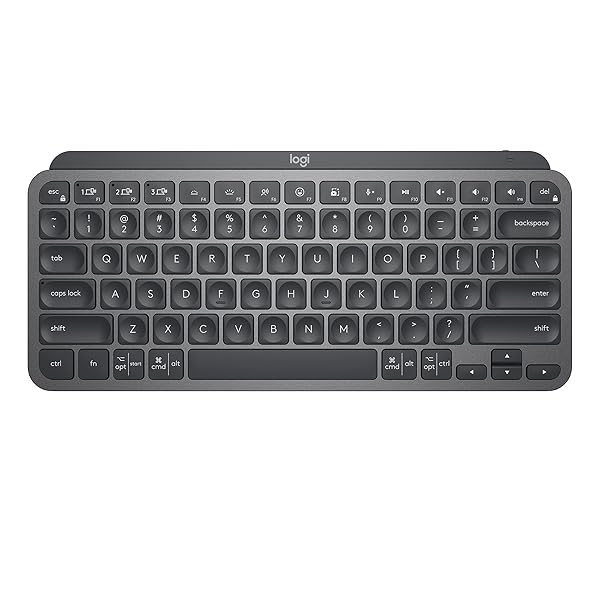
Logitech MX Keys Mini
Compact wireless backlit keyboard, 3 devices
- Low, quiet keys
- Size
- 75%
- Switches
- Membrane
- Best for
- Office, Typing
- Wireless
- Yes
- Hot-swap
- No
PriceToday's price on AmazonView on Amazon
Keychron K3 Max
Low-profile 75% wireless board, hot-swap
- Low, quiet keys
- Size
- 75%
- Best for
- Typing, Office
- Wireless
- Yes
- Hot-swap
- Yes
- Backlight
- RGB
PriceToday's price on AmazonView on Amazon
Logitech MX Mechanical
Low-profile wireless mechanical, tactile switches
- Low, quiet keys
- Size
- Full size
- Switches
- Tactile
- Best for
- Office, Typing
- Wireless
- Yes
- Hot-swap
- No
PriceToday's price on AmazonView on Amazon
Compare the top picks
| Model | Size | Switches | Best for | Wireless | Hot-swap |
|---|---|---|---|---|---|
| Logitech MX Keys S | Full size | Membrane | Office, Typing | Yes | No |
| Logitech POP Icon Keys | Tenkeyless | Membrane | Office, Typing | Yes | No |
| NuPhy Air75 V3 | 75% | – | Gaming, Office, Typing | Yes | Yes |
| Logitech Pebble Keys 2 K380s | 75% | Membrane | Office | Yes | No |
| NuPhy Node75 | 75% | – | Gaming, Office, Typing | Yes | No |
| NuPhy Air100 V3 | Full size | – | Office, Typing, Gaming | Yes | Yes |
| Logitech Ergo K860 | Split | Membrane | Office, Typing | Yes | No |
| Logitech MX Keys Mini | 75% | Membrane | Office, Typing | Yes | No |
| Keychron K3 Max | 75% | – | Typing, Office | Yes | Yes |
| Logitech MX Mechanical | Full size | Tactile | Office, Typing | Yes | No |
What to look for
Low-profile mechanical or scissor keys?
Low-profile mechanical switches keep a separate switch under each key, with shorter travel than standard ones. Scissor keys, as on the Logitech MX Keys S, travel even less and feel like a premium laptop. Mechanical ones give more feedback; scissor ones are quieter and thinner.
Easier on the wrists
Because the keys sit lower, your wrists bend upward less, and most people type comfortably without a wrist rest. Keep the keyboard flat, at about elbow height, with your wrists straight.
Check keycap and switch compatibility
Low-profile switches use their own keycaps, so standard keycap sets won't fit, and only some boards let you swap switches. If you like to customise, look for a hot-swappable low-profile board and check which switch type it takes.
How we picked
We compared 232 keyboards with real Amazon listings and kept the 41 that meet all of this:
- Low, quiet keys
Every pick fits, so the order is about what to look at first. Models that independent reviewers recommend come first, the most often recommended at the top. The rest follow, best known and best liked first, with the newest model of a line ahead of older ones. No brand pays to be listed or placed higher. Prices change daily, so we never print one; Amazon shows today's price.
Reviews we drew on
We don't test products ourselves. These published roundups recommend picks on this list:
- nytimes.com The 6 Best Bluetooth and Wireless Keyboards of 2026
- tomsguide.com The best mechanical keyboards in 2026: Our 9 top picks tested by experts
- pcmag.com The Best Ergonomic Keyboards We've Tested for 2026
- rtings.com The 6 Best Wireless Keyboards of 2026
- rtings.com The 6 Best Keyboards of 2026
- ign.com Best Wireless Keyboards 2026: How to Go Wire-Free at Home
- engadget.com The best keyboards for 2026
Questions
Are low-profile keyboards good for gaming?
Yes. They register presses as quickly as full-height boards, and the shorter travel can feel faster. Gaming-focused low-profile boards add higher polling rates and, on some, rapid trigger switches.
Are low-profile keyboards better for typing?
Many people find them more comfortable, especially if they're used to a laptop, because the keys need less travel and the wrists sit lower. Others prefer the deeper feel of full-height switches; both can be good for long typing.
Do low-profile keyboards need a wrist rest?
Usually not. The low height keeps your wrists close to the desk, so most people type comfortably without one. A thin rest can still help if you rest your palms between bursts of typing.
Can you use normal keycaps on a low-profile keyboard?
Usually not. Many low-profile switches, such as Kailh Choc, have a different stem and need matching low-profile keycaps. Some use a cross-shaped stem that takes certain thin keycaps, so check the switch before you buy caps.
Are these links sponsored?
Links to Amazon may earn Build Your Setup a commission. It does not change what you pay, and no brand pays to be listed or placed higher.